
Steering wheel button control adapter for Nissan / Opel / Renault ACV SWC 42XRN007-0
steering wheel adapter for Nissan NV 400 (09/10->06/14), Primastar (X83) (01/11->05/15), Opel Movano (B) (02/10->08/14), Vivaro B (X83) (01/11->08/14), Renault Clio III (R) (05/09->04/14), Grand Modus (P) (01/08->03/13), Grand Scenic (04/09->09/16), Laguna III (BT) (10/07->09/14), Master III (02/10->08/14), Modus (P) (04/08->12/12), Mégane III (BZ/Z) (10/08->12/13), Scenic III (JZ) (06/09->02/12), Trafic II (JL/FL/EL Facelift) (01/11->08/14), Twingo II (N) (09/09->12/11) a Wind (N) (08/10->08/13)
More about the product
More about the product
We will help you with your purchase
- You can return the goods to us within 14 days
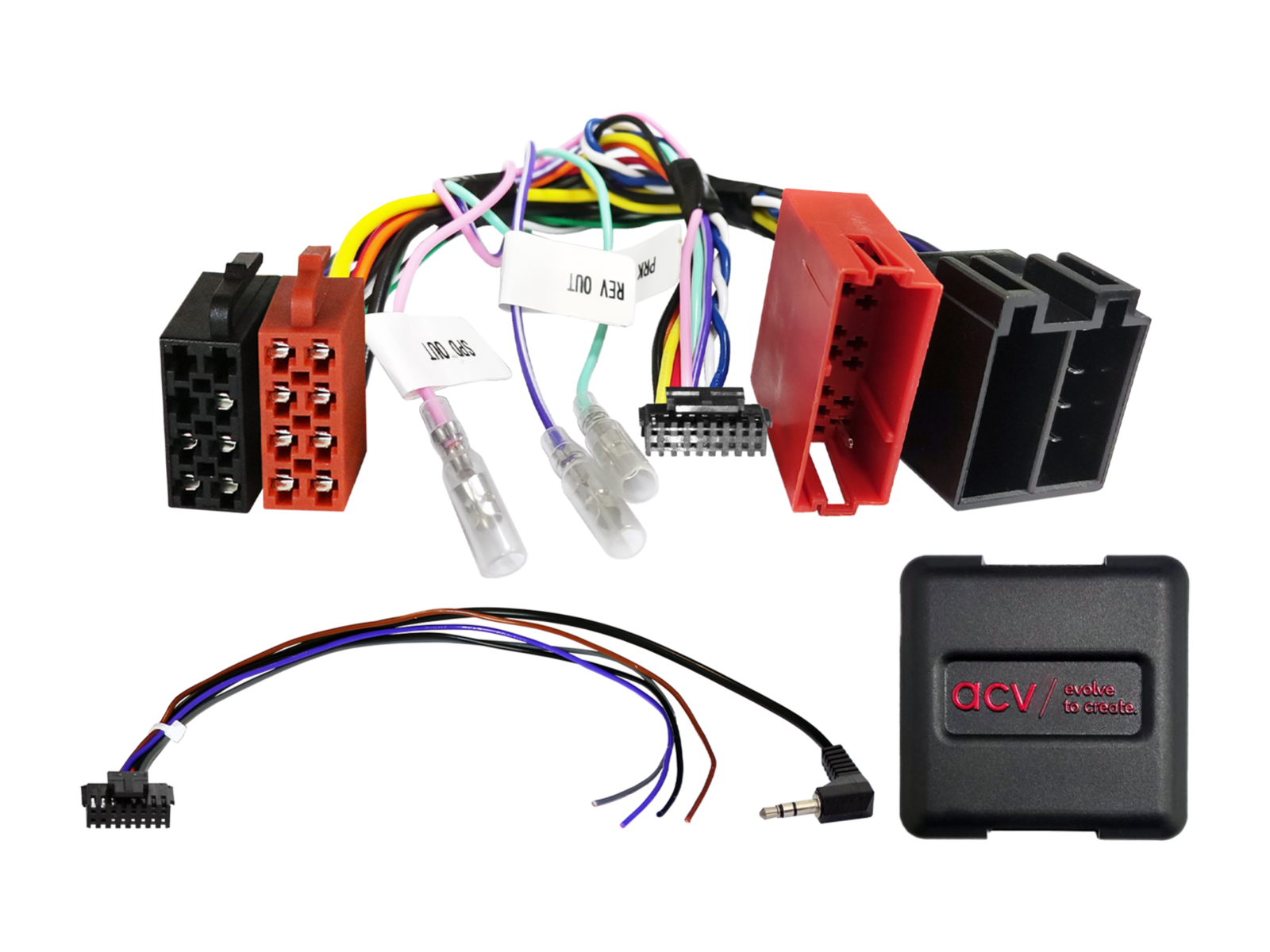
Steering wheel button control adapter for Nissan / Opel / Renault ACV SWC 42XRN007-0
Retain the original steering wheel radio control functions when replacing the factory radio with an aftermarket unit. Depending on the vehicle's equipment, the range of functions and the software of the newly installed head unit, some functions may be limited or replaced by others. Compare the displayed wiring connectors with the connectors in your vehicle and make sure they match both technically and visually. Check whether one of the listed OEM head units was originally installed. Before final installation, verify the vehicle functionality, system settings and proper operation of the steering wheel control (SWC).
Intended for vehicles
- Nissan NV 400 (09/2010 -> 06/2014) - original OEM head unit.
- Nissan Primastar [X83] (01/2011 -> 05/2015) - vehicles with OEM HU with display without front USB, SWC item Nissan/Renault ISO/Mini ISO yellow/OEM HU with display: 42k-1250-000.
- Opel Movano (B) (02/2010 -> 08/2014) - original OEM head unit.
- Opel Vivaro B [X83] (01/2011 -> 08/2014) - vehicles with OEM HU with display without front USB, SWC item Nissan/Renault ISO/Mini ISO yellow/OEM HU with display: 42k-1250-000.
- Renault Clio III [R] (05/2009 -> 04/2014) - original OEM head unit.
- Renault Grand Modus [P] (01/2008 -> 03/2013) - original OEM head unit.
- Renault Grand Scenic (04/2009 -> 09/2016) - original OEM head unit.
- Renault Laguna III [BT] (10/2007 -> 09/2014) - original OEM head unit.
- Renault Master III (02/2010 -> 08/2014) - original OEM head unit.
- Renault Modus [P] (04/2008 -> 12/2012) - original OEM head unit.
- Renault Mégane III [BZ/Z] (10/2008 -> 12/2013) - original OEM head unit.
- Renault Scenic III [JZ] (06/2009 -> 02/2012) - original OEM head unit.
- Renault Trafic II [JL/FL/EL Facelift] (01/2011 -> 08/2014) - vehicles with OEM HU with display without front USB, SWC item Nissan/Renault ISO/Mini ISO yellow/OEM HU with display: 42k-1250-000.
- Renault Twingo II [N] (09/2009 -> 12/2011) - vehicles with OEM head unit listed in the Update List.
- Renault Wind [N] (08/2010 -> 08/2013) - vehicles with OEM head unit listed in the Update List.
CAN Bus Information
Connectors and Interfaces:
- Connector: ISO / Mini ISO.
- OEM steering wheel control connection: 3.5 mm jack or loose wire.
Settings:
- DIP switch settings according to the manufacturer of the aftermarket unit (see BDA).
Vehicle Compatibility:
- Vehicles with external display – the display must be reconnected to the vehicle.
- Vehicles without Arkamys DSP OEM amplifier system.
- Vehicles without OEM HU with built-in display without front USB.
- Vehicles without Radiosat Classic OEM HU – contact support.
- Date and time setting supported.
Important Additional Information
- Compatible with aftermarket car radios with analog steering wheel control input (e.g. Sony, Kenwood, JVC, Pioneer, Alpine, Blaupunkt, Clarion, Zenec etc.).
- To fully activate the adapter, a connection cable for the specific car radio brand must be ordered.
General Installation Instructions
Verification Before Installation:
- Check all control functions and vehicle settings using the original OEM HU.
- Disconnect the original radio (OEM HU) in a voltage-free condition.
- Check all interface connections – without power.
Connection and Installation Sequence:
- Set and check the HW configuration of the interface – without power.
- Check the configuration of the HU connection cable – without power.
- Connect the cable to the HU according to the aftermarket device manual.
- Connect the remaining wires according to the device manual.
- Connect the complete installation to the vehicle – connect the main power supply last.
- Perform the software configuration of the interface according to the product description or manual.
- Configure the aftermarket HU (steering wheel control, camera, handsfree, antenna power etc.).
- Perform a functional test of steering wheel control and vehicle communication.
Configuration Changes:
- All changes must be carried out without power.
- After changes repeat steps 5 to 8 above.
In Case of Failure:
- Reinstall the original OEM HU.
- Start the original unit.
- Initiate CAN Bus shutdown.
- Check the HW configuration of the interface.
- After CAN Bus shutdown repeat steps 5 and 6.
When Modifying Wiring:
- Installation and modifications may only be carried out by professionally trained personnel.
- All changes must be verified before connection regarding manufacturer approval or impact on vehicle warranty.
- All modifications must be verified by measurement and comparison with the vehicle wiring diagram.
- Modifications are carried out at your own responsibility without guarantee of functionality.
- Modifications are performed at your own risk without guarantee against damage to the vehicle, device or interface.
- Modifications of pre-installed wiring may result in loss of product warranty.
| Catalog number | 42XRN007-0 |
| Brand | ACV |
| Links | Official web presentation |
Evaluation
- Car radios and accessories Steering wheel button control adapters Nissan steering wheel adapters
- Car radios and accessories Steering wheel button control adapters Nissan steering wheel adapters Nissan NV400 steering wheel adapters
- Car radios and accessories Steering wheel button control adapters Nissan steering wheel adapters Nissan Primastar steering wheel adapters
- Car radios and accessories Steering wheel button control adapters Opel steering wheel adapters
- Car radios and accessories Steering wheel button control adapters Opel steering wheel adapters Opel Movano steering wheel adapters
- Car radios and accessories Steering wheel button control adapters Opel steering wheel adapters Opel Vivaro steering wheel adapters
- Car radios and accessories Steering wheel button control adapters Renault steering wheel adapters
- Car radios and accessories Steering wheel button control adapters Renault steering wheel adapters Renault Clio steering wheel adapters
- Car radios and accessories Steering wheel button control adapters Renault steering wheel adapters Renault Grand Modus steering wheel adapters
- Car radios and accessories Steering wheel button control adapters Renault steering wheel adapters Renault Grand Scenic steering wheel adapters
- Car radios and accessories Steering wheel button control adapters Renault steering wheel adapters Renault Laguna steering wheel adapters
- Car radios and accessories Steering wheel button control adapters Renault steering wheel adapters Renault Master steering wheel adapters
- Car radios and accessories Steering wheel button control adapters Renault steering wheel adapters Renault Megane steering wheel adapters
- Car radios and accessories Steering wheel button control adapters Renault steering wheel adapters Renault Modus steering wheel adapters
- Car radios and accessories Steering wheel button control adapters Renault steering wheel adapters Renault Scenic steering wheel adapters
- Car radios and accessories Steering wheel button control adapters Renault steering wheel adapters Renault Trafic steering wheel adapters
- Car radios and accessories Steering wheel button control adapters Renault steering wheel adapters Renault Twingo steering wheel adapters
- Car radios and accessories Steering wheel button control adapters Renault steering wheel adapters Renault Wind steering wheel adapters
- ACV
ask us